v1.1.0 Release | Open Source (MIT) Smart Actions & Product Identification

Scan Smarter. Instantly.

QRYPT QR & Barcode Scanner is a fast, privacy-first Android optical utility engineered by ArnobRazz. Decode 13 industrial and retail barcode formats in real time, trigger verified smart actions (Open Link, View Product, Call, Send Email, Send Message, View Location, Add Contact), identify retail products via Open Food Facts with local Room SQLite caching, run batch inventory sessions, and generate 1024px HD custom QR codes.

Developer: ArnobRazz (@CodeByArnob) Target: Android 7.0+ (API 24 to 36) Release Notes & SHA-256: v1.1.0 Release (v1.0.0 Archive)
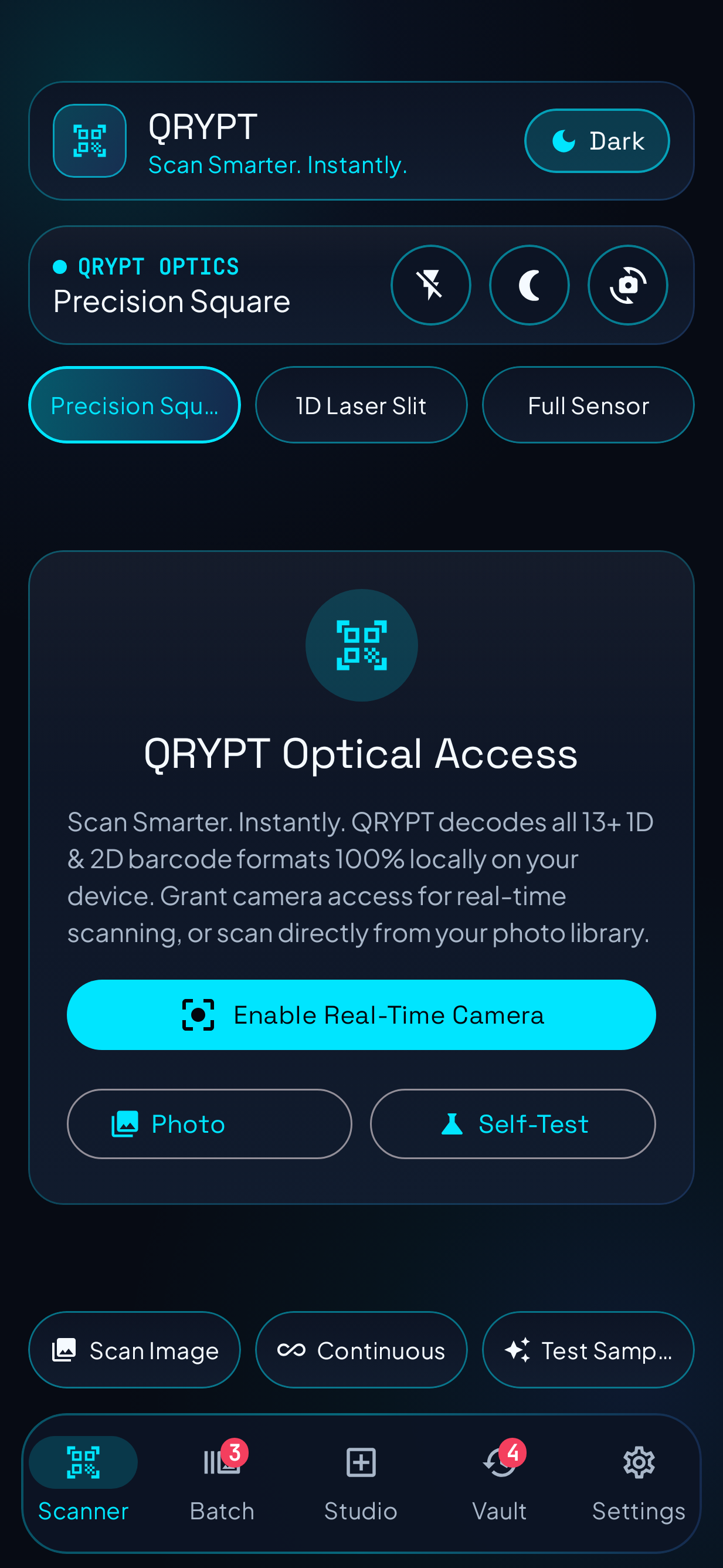
QRYPT Live Optical Scanner screen showing Precision Square reticle, 1D Laser Slit toggle, Torch, Low-Light Boost, and Photo Library controls
Optical Scanner HUD (#070B14)
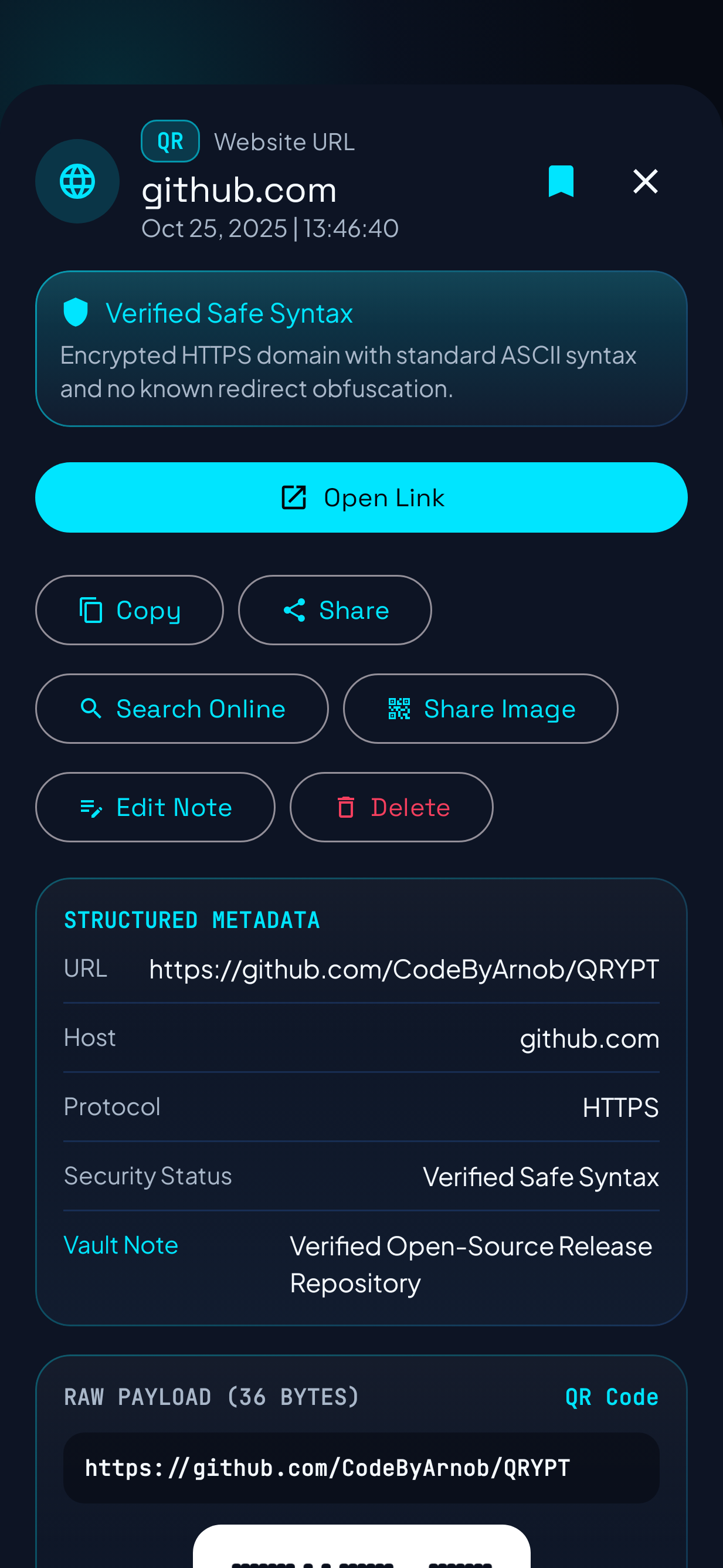
QRYPT Smart Result Sheet showing verified HTTPS security shield, Open Link action, parsed URL details, and one-tap actions
Smart Scan Result Sheet
13 Formats 2D Matrix & 1D Industrial/Retail Barcodes
Smart Actions Open Link, View Product, Call, Email, SMS, Maps
Product Lookup Open Food Facts v3 HTTPS + Local Room Cache
1024px to 1536px High-Resolution QR & Barcode Studio Export
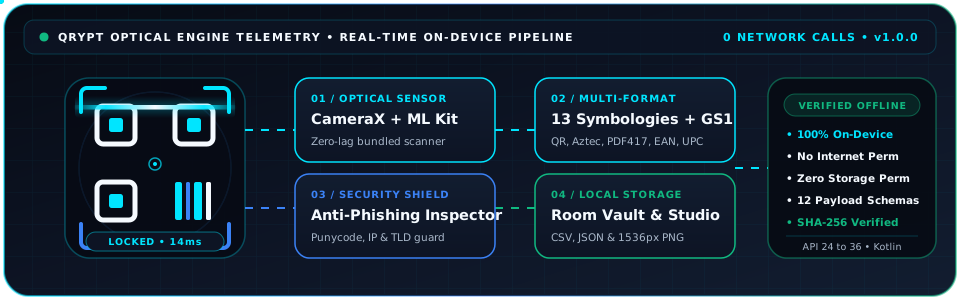
Animated QRYPT Optical Pipeline showing CameraX, ML Kit, 13 Symbologies, Anti-Phishing Shield, and Room SQLite Vault
Verified Capabilities

Engineered for Speed, Accuracy & Total Privacy

Every capability listed below is implemented directly in the Kotlin + Jetpack Compose codebase and tested via automated JUnit & Robolectric verification suites.

Real-Time CameraX + ML Kit Optical Scanner

Hardware-accelerated CameraX ImageAnalysis pipeline with STRATEGY_KEEP_ONLY_LATEST backpressure. Features Precision Square, 1D Laser Slit, and Full Frame target modes, pinch-to-zoom, tap-to-focus metering, Torch control, and automatic Y-plane low-light exposure boost (< 45 lux).

  • CameraX 1.5
  • Bundled ML Kit 17.3
  • Low-Light Boost

Smart Scan Result Actions & Product Identification

Every decoded code opens an interactive result sheet with context-aware actions: Open Link (with user confirmation dialog), View Product, Call, Send Email, Send Message, View Location, Add Contact, Copy, Share, and Search Online. Retail barcodes (EAN-13, EAN-8, UPC-A, UPC-E, ISBN) automatically query Open Food Facts v3 over HTTPS and cache product details locally in Room SQLite.

  • Open Link & View Product
  • Open Food Facts API v3
  • Room Product Cache

Anti-Phishing URL Security Shield & Scheme Guard

Every scanned URL is inspected on-device by PayloadParser.analyzeUrlSecurity() before opening a browser. Strictly blocks unsafe URI schemes (javascript:, data:, file:, intent:) and flags unencrypted http:// cleartext links, Punycode (xn--) homograph spoofing, raw IPv4/IPv6 hosts, embedded @ authority credentials, suspicious TLDs, and link shorteners.

  • Homograph Detection
  • Unsafe Scheme Blocker
  • GS1 Checksum

High-Speed Batch & Continuous Inventory

Scan dozens of items in rapid succession with configurable duplicate cooldown suppression, inline smart actions on each captured item, live session counters, and bulk inventory/warehouse note tagging. Export complete batch sessions to RFC-4180 CSV or structured JSON with one tap.

  • Batch Queue
  • Duplicate Guard
  • CSV & JSON Export

Optical QR & 13-Format Generator Studio

Create custom QR codes and 1D/2D barcodes across 10 structured templates (URL, Wi-Fi, vCard 3.0, Retail GTIN, Email, SMS, Phone, Geo, Calendar, Text). Customize error correction (L, M, Q, H), rounded modules, color presets, and export up to 1536px PNGs.

  • 13 Symbologies
  • 10 Templates
  • HD PNG Share

Local Room SQLite Optical Vault

All scanned and generated records plus cached product lookup metadata are persisted strictly on-device inside prism_scan_vault.db. Features instant full-text search across payloads and notes, 9 category/security filters, favorite bookmarking, and granular vault purge controls.

  • Room SQLite 2.8
  • 9 Category Chips
  • 1-Tap Vault Purge

1. Retail Barcode & Nutrition Lookup

Scan EAN-13, EAN-8, UPC-A, UPC-E, and ISBN barcodes to automatically identify products, brands, ingredients, Nutri-Score, and nutrition facts per 100g.

2. Security-Conscious Link Inspection

Inspect restaurant menus, parking meters, and public posters for Punycode homographs, raw IP links, or unencrypted HTTP redirects before confirming external navigation.

3. Retail & Warehouse Batch Auditing

Use the 1D Laser Slit and Batch Mode to scan EAN-13, UPC-A, Code 128, and ITF carton labels, tag aisle notes, and export RFC-4180 CSV sheets to your ERP.

4. Print & Digital Asset Studio

Generate high-contrast QR codes, ISBN/EAN retail barcodes with automatic Modulo-10 check digits, and PDF417 badges at up to 1536x1536px resolution.

Genuine Application Renders

Real Jetpack Compose UI Across Dark & Daylight Themes

Every screenshot below is rendered directly from the real QRYPT Android application codebase via our automated Robolectric Native-Graphics test suite (./scripts/capture-screenshots.sh). Click any screen to inspect full size.

01 / SCANNER Dark #070B14

Optical Scanner HUD

Precision Square reticle, 1D Laser Slit selector, Torch, Low-Light Boost, Photo Library & Self-Test controls.

02 / RESULT Dark #070B14

Smart Result & Security Shield

Offline anti-phishing verification badge, parsed metadata table, favorite toggle, and context-aware actions.

03 / MODES Dark #070B14

Continuous & 1D Laser Slit Mode

Horizontal laser slit for tightly packed 1D barcodes plus uninterrupted continuous stream capture.

04 / BATCH Dark #070B14

Batch Inventory Mode

Multi-scan session queue with duplicate guard, bulk warehouse note tagging, and one-tap CSV/JSON export.

05 / VAULT Dark #070B14

Local Optical Vault

100% offline Room SQLite history with instant search, 9 category filters, favorites, and bulk export.

06 / STUDIO Dark #070B14

Optical Generator Studio

13-format QR & barcode creator with 10 structured payload templates, custom colors, and HD PNG export.

07 / SETTINGS Dark #070B14

Settings & Engine Controls

Displays QRYPT identity (Developer: Arnobrazz | Version 1.1.0), product lookup toggle, accent wavelengths, and privacy controls.

08 / DAYLIGHT Light #F4F7FB

Frosted Daylight Light Theme

High-contrast daylight color scheme with a 1-tap header toggle for bright outdoor scanning.

13 Symbologies + 12 Structured Schemas

Comprehensive Industrial, Retail & 2D Matrix Support

Verified against BarcodeFormatType and PayloadParser.kt. QRYPT both decodes and generates all 13 symbologies locally.

Category Supported Formats / Schemas Validation & Smart Actions
2D Matrix Formats (4)
QR_CODE AZTEC DATA_MATRIX PDF417
Full Reed-Solomon error correction (L, M, Q, H for QR), multi-rotation decoding, and high-density boarding pass / ID support.
1D Retail GTIN & Bookland (4)
EAN_13 EAN_8 UPC_A UPC_E
Automatic Modulo-10 check-digit computation, GS1 Country/Region Prefix Lookup, and ISBN-13 / ISBN-10 detection.
1D Industrial & Logistics (5)
CODE_128 CODE_39 CODE_93 CODABAR ITF
Dedicated 1D Laser Slit viewfinder mode, warehouse batch tagging, and automatic even-length digit normalization for ITF.
Structured Payload Parsers (12)
URL (HTTP/HTTPS) WIFI: VCARD / MECARD VEVENT Calendar mailto: / MATMSG: smsto: tel: geo: ISBN PRODUCT GTIN JSON TEXT
One-tap system intents: Open Verified Link, Copy Wi-Fi Password & Open Wi-Fi Settings, Save Contact, Add Calendar Event, Dial, SMS, Email, Open Maps.
Zero-Trust Local Architecture

Privacy by Engineering, Not Just Policy

Verified directly from app/src/main/AndroidManifest.xml and app/build.gradle.kts.

Verified Privacy & Scoped Product Lookup

  • On-Device Optical Decoding: All camera frames and gallery images are decoded 100% locally on your device using bundled Google ML Kit (`17.3.0`) and ZXing Core (`3.5.3`). No images or QR codes are ever uploaded.
  • Scoped HTTPS Product Lookup: When a retail GTIN barcode (`EAN-13`, `EAN-8`, `UPC-A`, `UPC-E`, `ISBN`) is scanned, QRYPT sends only the numeric barcode over HTTPS to Open Food Facts (`world.openfoodfacts.org`) and caches the result in Room SQLite (`product_cache`).
  • Local SQLite & DataStore Sandbox: History, cached products, and preferences stay inside your private app storage (`prism_scan_vault.db`) with 1-tap Vault Purge at any time.
  • Scoped File Exports: CSV, JSON, and PNG exports use androidx.core.content.FileProvider (android:exported="false") only when you explicitly tap Share or Export.

Permissions Explained in Plain Language

  • android.permission.CAMERA (Optional Runtime): Used strictly to analyze live viewfinder frames in volatile memory. If denied, you can still scan images from your photo library, use the Self-Test suite, browse the Vault, and create codes in Studio.
  • android.permission.INTERNET & ACCESS_NETWORK_STATE: Used strictly to fetch public product metadata and images from Open Food Facts over HTTPS when a retail product barcode is scanned.
  • Zero Storage Permissions: QRYPT uses the system Android Photo Picker (PickVisualMedia) and never requests READ_MEDIA_IMAGES or READ_EXTERNAL_STORAGE.
  • Zero Tracking Permissions: Never requests Location, Contacts, Microphone, Phone State, SMS, or Bluetooth permissions.
Get Started in 60 Seconds

How to Install, Verify & Build QRYPT

Download the verified release APK directly from GitHub Releases or compile from source with JDK 17/21 and Gradle.

1

Download Verified APK

Download QRYPT-v1.1.0-release.apk or QRYPT.apk from the official GitHub Release v1.1.0 page on your Android device (Android 7.0 / API 24 or newer).

2

Verify SHA-256 File Checksum (Optional)

Every GitHub release includes a public SHA256SUMS.txt file fingerprint (not a private key) so users can verify the downloaded APK was not corrupted:

sha256sum QRYPT-v1.1.0-release.apk
# Compare with SHA256SUMS.txt on the v1.1.0 GitHub Release page
3

Build & Test From Source

Clone the repository and run the unit & Robolectric verification suite or assemble a debug APK locally:

git clone https://github.com/CodeByArnob/QRYPT.git
cd QRYPT
gradle :app:testDebugUnitTest
gradle :app:assembleDebug
Transparent Note on Direct APK Sideloading & Signing: Because QRYPT is distributed directly as an independent open-source APK on GitHub Releases rather than through the Google Play Store, Android's Google Play Protect may display a standard notice: "Play Protect hasn't seen an app from this developer before." Tap More details and then Install anyway to complete installation.
Frequently Asked Questions

Everything You Need to Know

How do Smart Scan Result Actions and Product Identification work in v1.1.0?
Every scanned QR code or barcode opens a structured result sheet with context-aware actions: Open Link for websites (with a security confirmation dialog), View Product for identified retail barcodes, Call, Send Email, Send Message, View Location, Add Contact, Copy, Share, and Search Online. When a retail barcode (EAN-13, EAN-8, UPC-A, UPC-E, ISBN) is scanned, QRYPT queries the Open Food Facts v3 HTTPS endpoint and caches the product locally in Room SQLite.
How can QRYPT scan photos from my gallery without requesting storage permissions?
QRYPT uses Android's modern system Photo Picker (ActivityResultContracts.PickVisualMedia). When you tap Photo Library, the Android OS presents its built-in picker and grants QRYPT temporary read access only to the single image you choose, keeping the rest of your photo library completely private.
How does the offline URL anti-phishing analyzer work?
Whenever a QR code or barcode contains a link, PayloadParser.analyzeUrlSecurity() inspects the URI structure locally. It blocks unsafe URI schemes (javascript:, data:, file:, intent:) and flags unencrypted http:// protocols, Punycode (xn--) internationalized homograph attacks, raw IPv4/IPv6 hostnames, embedded @ authority spoofing, high-risk top-level domains, and URL shorteners before launching any browser intent.
Why is the internal Android package identifier hidden from the user interface?
To keep the interface clean and consumer-friendly, the Settings screen displays only the product identity (QRYPT | Scan Smarter. Instantly.), developer (Arnobrazz), and version (1.1.0). Under the hood, applicationId = "com.arnobrazz.qrypt" remains intact in app/build.gradle.kts for standard Android installation and upgrades.
What Android versions are supported?
QRYPT supports Android 7.0 Nougat (API 24) through Android 16 (API 36), including foldables, tablets, and Android 12+ Material You Dynamic Color themes.
How can I contribute, report a bug, or disclose a security issue?
Read our Contribution Guide and open an issue or pull request on GitHub Issues. For security vulnerabilities, please follow our Security Policy and email arnobrazz.dev@gmail.com.